Guide
Strata turns the FM-1 into a wavetable synth, an 8-track looper and a drum machine. This page gets you playing and shows every feature at a glance; each card links to its chapter of the Manual. Every button is on the cheat sheet.
Quick start
- Install. Open the site's Install page in Chrome or Edge, make a backup, then press Find the FM-1 and Write Strata (how).
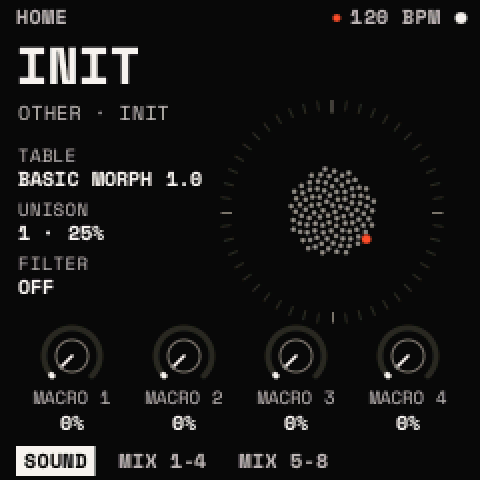
- Play. Switch the FM-1 on. HOME shows the sound. Play the keys; OCT− and OCT+ change the octave, and MASTER sets the level.
- Pick a sound. Turn PRESETS to choose a preset from the list, then press SAVE twice to load it.
- Change it. Press EDIT. Turn SELECT to choose a module (OSC A, OSC B, SUB, NOISE, FILTER, MATRIX), ALGORITHM to choose a page, and KNOB 1 to 4 to set the values. Hold EDIT and press OCT+ to switch the module shown on.
- Save it. Press SAVE. In the window, SAVE AS NEW is chosen for a sound you haven't saved before (OCT− and OCT+ move the choice). Press SAVE to confirm, then SAVE again to keep the suggested name.
Hold HOME on any screen to see what every control does there. SAVE + OCT− undoes your last change.
How the buttons work
| Press | Does |
|---|---|
| A menu button once | Opens its menu where you left it (pressed again: its first page) |
| Twice, quickly | Its second job (EDIT twice: the wavetable list) |
| Held | Its layer, for as long as you hold it (FX held: the macros) |
| Press | Does |
|---|---|
| Button + OCT+ | Switches its feature on, or adds |
| Button + OCT− | Switches it off, or removes |
| Button + OCT− held 5 s | Resets what the menu shows |
Features
Sound
Two wavetable oscillators on 54 tables, a sub, noise and a filter, with eight voices.
- EDIT oscillators, filter, matrix
- EDIT twice: wavetable list
- EDIT + OCT+/OCT−: module on/off
- GLO: voice mode, glide
Movement
Two envelopes, two drawable LFOs and four macros, routed by an 8-slot matrix.
- ENV twice: an envelope or macro onto a knob
- LFO twice: an LFO onto a knob
- REC held + a white key: the MOD layer
- LFO + OCT+: add an LFO point
Effects
A chain of up to eight effects from thirteen types, in any order.
- FX: the chain
- FX + OCT+: add the type chosen
- FX twice: open the effect
- FX + OCT−: remove or bypass
Performing
Bend, mod wheel, macros and temporary tweaks from the knobs.
- GLO held: PERFORM (bend, wheel, glide)
- FX held: MACROS and effect bypass
- LFO held: MOMENTARY changes
- GLO held + PLAY taps: tap tempo
Scales, chords, ARP
Fit the keys to a scale, play a chord on every key, arpeggiate it in time.
- SCL: scale and root
- SCL + OCT+: chords on
- ARP + OCT+: arpeggiator on
- ARP: style, groove, 16 steps
Looper
Eight tracks of clips in eight scenes. Record takes and overdubs, then launch them.
- SEQ: clips, mixer, song
- REC: record; REC twice: keep what you just played
- SEQ held: launch pad
- SEQ twice: projects
Drums
Set a track's TYPE to DRUMS: eight drum rows, seven models, presets, kits and a step grid.
- EDIT: the drum and the kit
- EDIT twice: drum presets or kits
- SEQ, SELECT to CLIP: the grid
- DUCK row: sidechain the synth
Presets and saving
Eight starter sounds, INIT and 64 slots of your own, with undo.
- PRESETS, then SAVE twice: load
- SAVE: save or save as new
- SAVE twice: the browser
- SAVE + OCT− / OCT+: undo / redo
MIDI and USB
MIDI in over USB and the jack, MIDI out over USB, and USB audio to a computer.
- SETTINGS > MIDI: channel, LEARN, program change
- Track TYPE MIDI: notes out to a DAW
- GLOBAL > CLOCK IN: follow MIDI clock
Settings
Themes, LED brightness, knob feel, MIDI, power saving.
- HOME twice: SETTINGS
- HOME held: help map
- SETTINGS > WIPE: settings back to default
Installing
Install from the web page, back up first, and go back at any time.
- Install page: Find the FM-1, Write Strata
- Return to official V15, or Felucca's installer
- OCT− + OCT+ held 5 s: backup mode
When things go wrong
Messages explained, sounds that won't play, crashes and limits.
- HOME held at power-on: start without the last sound
- SETTINGS > WIPE: reset the settings