Settings, LEDs and DEBUG
Press HOME twice for the SETTINGS. ALGORITHM steps the pages; HOME leaves. Settings are kept by themselves a few seconds after you stop playing.
SETTINGS
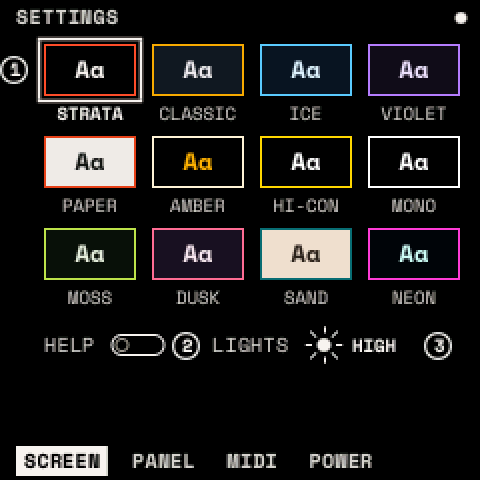
| Page | Setting | What it does |
|---|---|---|
| SCREEN | COLOR | Twelve themes: STRATA, CLASSIC, ICE, VIOLET, PAPER, NIGHT, HI-CON, MONO, MOSS, DUSK, SAND, NEON |
| HELP | Show a hint when a module opens (on) | |
| LIGHTS | LED brightness: OFF, LOW, MED, HIGH | |
| PANEL | ACCEL | Knobs faster when turned quickly (on) |
| HOLD | Time before a held button counts as held: 300–600 ms (400) | |
| MIDI | CHANNEL, LEARN, CLEAR, PROGRAM | See MIDI and USB |
| POWER | SHOW BATTERY | OFF, on HOME, or on every screen |
| SCREEN OFF AFTER | Darken the screen after 1, 5 or 15 minutes untouched; any control wakes it | |
| WIPE | WIPE | Turn KNOB 1, then press SAVE: every setting back to default. Presets, projects and drum library stay. |
The battery shows as four cells, or a bolt on USB power. Unconfirmed on hardware: the battery levels and the screen sleep.
LEDs
Every LED follows one code:
| LED | Means | Examples |
|---|---|---|
| Off | nothing there | an empty clip, a key outside the scale |
| Dim | something there | a clip, a scale note, a drum, a menu button not shown |
| Medium | in use | the scale's root, an accented drum, the grid's playhead |
| Lit | active | a key held, a clip playing, the menu shown, the beat |
| Blinking | waiting | a launched clip, a count-in |
| Breathing | recording, or a layer open | a held or latched layer's button |
REC is lit while recording and blinks while it waits for the bar. PLAY flashes on each beat while the transport runs. ARP is lit while the arpeggiator is on.
DEBUG
Hold HOME for 5 seconds (past the help map). These pages are for diagnosing the hardware:
- BENCH: what the FM-1 measures (audio, CPU, screen, keys, tables, flash, stacks). RUN times the processor.
- KEY SCAN: the panel's switches as they are read, live.
- CORE 2: the FM-1's second core, off by default. ON takes effect at the next power-on; TEST runs a 30-second load while something plays. Unconfirmed on hardware.